Train your own decision model with Unsloth on weightroom
October 9, 2026
A support ticket arrives: a customer was charged twice and wants a refund today. Your application needs three answers: which team should handle it, whether a refund was requested, and how urgent it is. You can train a model for these decisions in an Unsloth workspace on weightroom.
Unsloth's decision-model training lets you fine-tune an LLM for tasks like this. You supply the input, questions, and allowed answers. The model scores those answers and returns a probability for each option.
This walkthrough uses Qwen3.5-4B in a weightroom GPU workspace. You'll train it on a sample dataset, calibrate its probabilities, triage a ticket, and save a model you can reload. The main path uses JupyterLab; Unsloth Studio also offers a training UI.
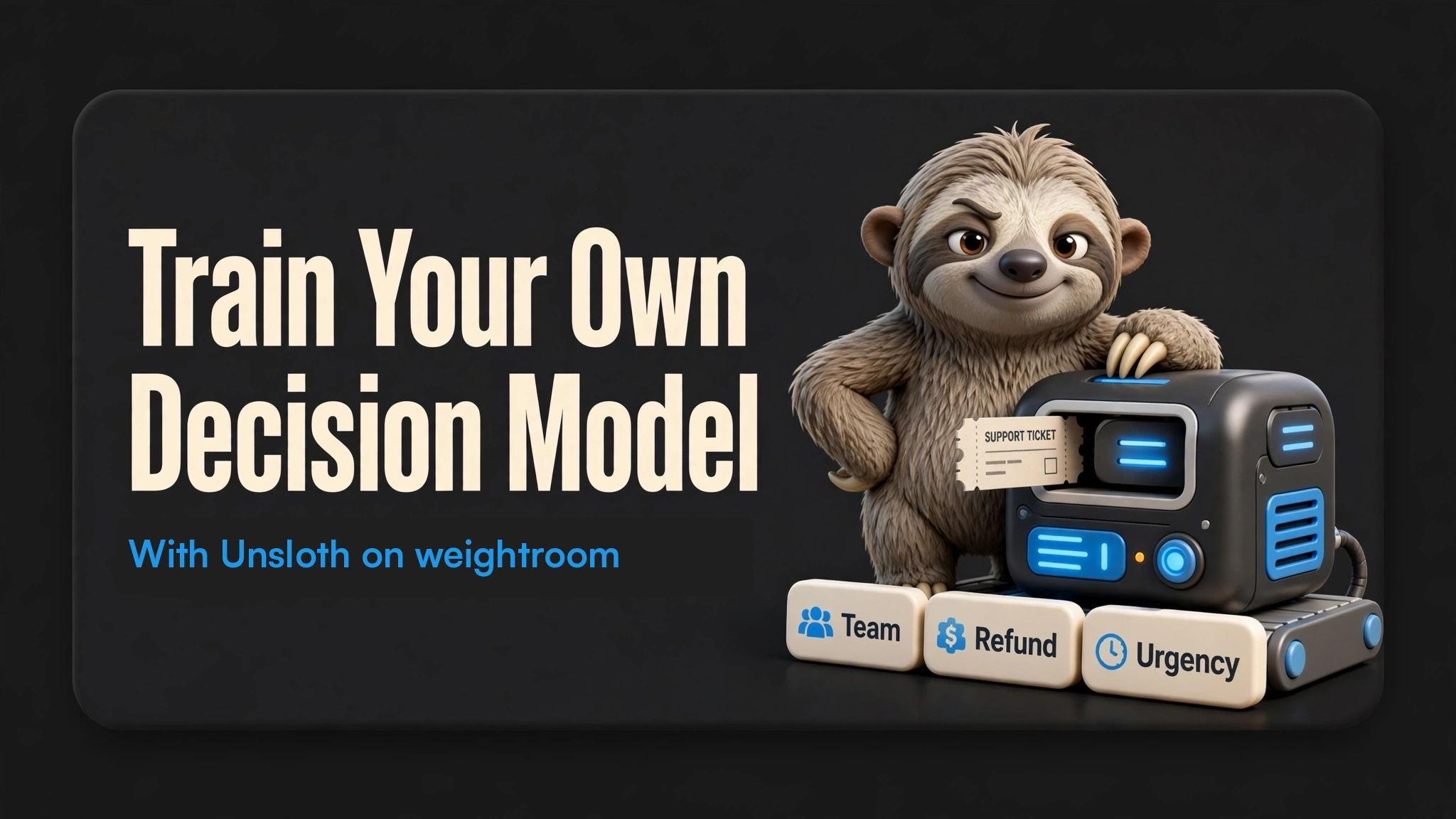
How a decision model answers
The model reads the input alongside your questions and options. A trained decision head scores the options without generating a text response. That gives your application a defined set of labels to work with. It can still choose the wrong label, so you need to evaluate both its answers and its confidence.
You can ask three types of question:
| Type | Example | answer from predict |
|---|---|---|
choice | Which team should handle this? | An option key, such as "billing" |
noul | Does the customer request a refund? | True or False |
score | How urgent is this? | A level number, starting at 0 |
Each result also includes probabilities. For a noul question, the probability of yes is probabilities["true"]; it is separate from the boolean answer.
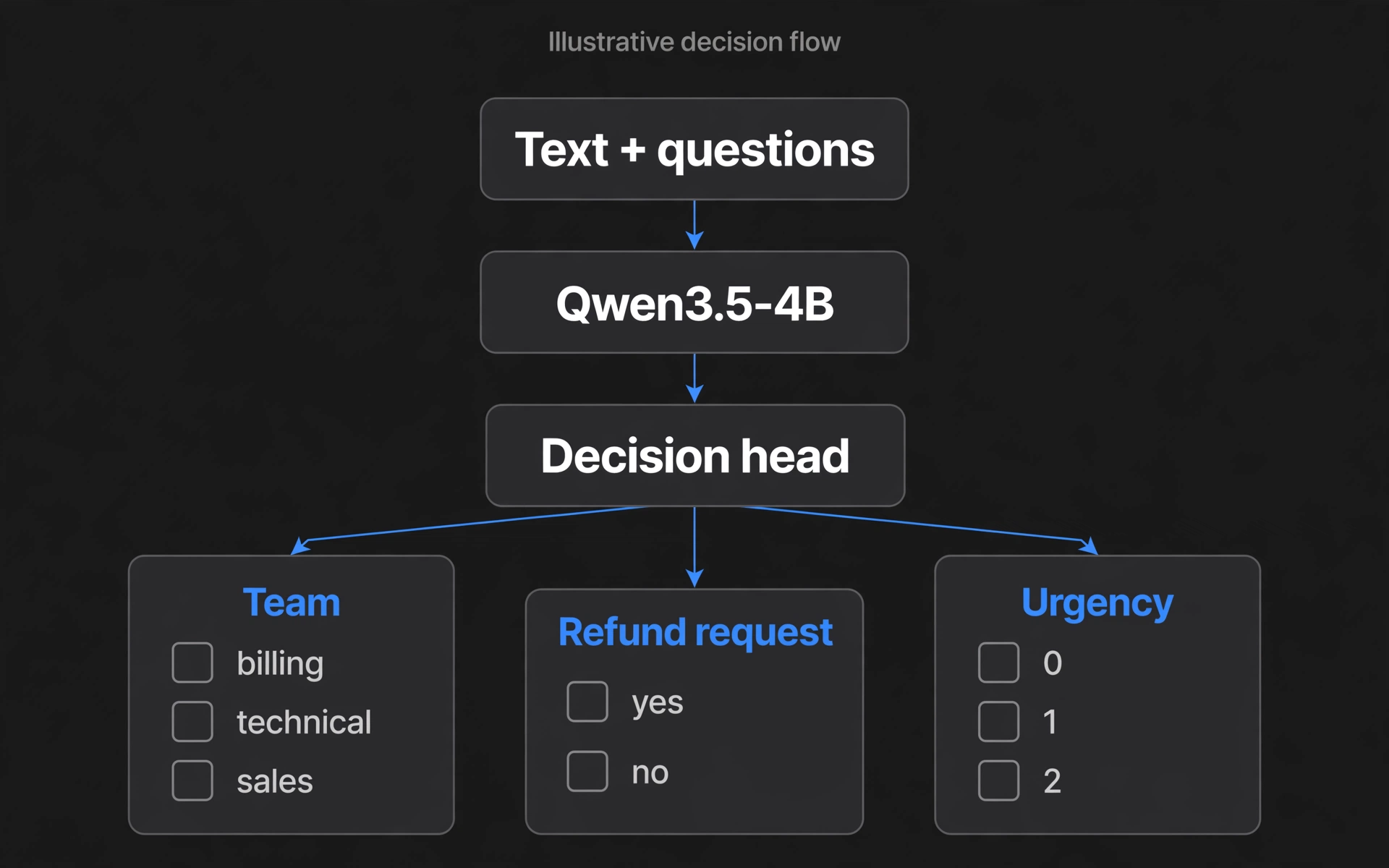
The same input supplies context for all three decisions. Options are shown without a predicted result.
Launch an Unsloth workspace
Launch the Unsloth workspace on weightroom and keep the JupyterLab add-on enabled. Start with one GPU; the code below uses a single device. The launch page lists available GPUs and current prices. An RTX A6000 offers 48 GB of VRAM and room to adjust the batch size.
When the workspace is ready, open JupyterLab from its access links and create a notebook in /workspace. Saved files and the Hugging Face cache live on the workspace volume. Keep the volume when stopping and resuming, and download a copy of your trained model before deleting the workspace. Resuming also requires an available GPU on the provider; stopping does not reserve one.
Run this first cell to check the GPU and record the environment:
from unsloth import FastDecisionModel, DecisionTrainer, is_bfloat16_supported
from importlib.metadata import version
from importlib.util import find_spec
import sys
import torch

assert torch.cuda.is_available(), "This walkthrough needs an NVIDIA GPU."
assert find_spec("unsloth.models.decision_from_lm") is not None, (
    "This environment needs an Unsloth build with base-LLM decision training."
)

print("Python:", sys.executable)
for package in ("unsloth", "unsloth_zoo", "transformers", "torch"):
    print(f"{package}: {version(package)}")
print("GPU:", torch.cuda.get_device_name(0))
print("PyTorch CUDA:", torch.version.cuda)
The module check matters: older Unsloth builds can load existing decision models but cannot convert a base LLM with the code below. If it fails, use an updated workspace image before continuing.
The weightroom image sets UNSLOTH_COMPILE_DISABLE=1 to avoid a PyTorch compiler error in this Qwen3.5 training path. Keep that setting for this walkthrough. Package auto-updates are also disabled so a new session uses the tested versions.
Prefer a UI?
Open Unsloth Studio from the workspace's access links. Sign in as unsloth, using Copy initial password under Studio login on the workspace page. If you change the password in Studio, use your new password on later visits.
In Train, choose unsloth/Qwen3.5-4B, select QLoRA, then set Train as to Decision model. Select LocalLLaMA/typed-decisions with Subset set to all. Use two epochs, LoRA rank 16, alpha 16, and a learning rate of 2e-4.
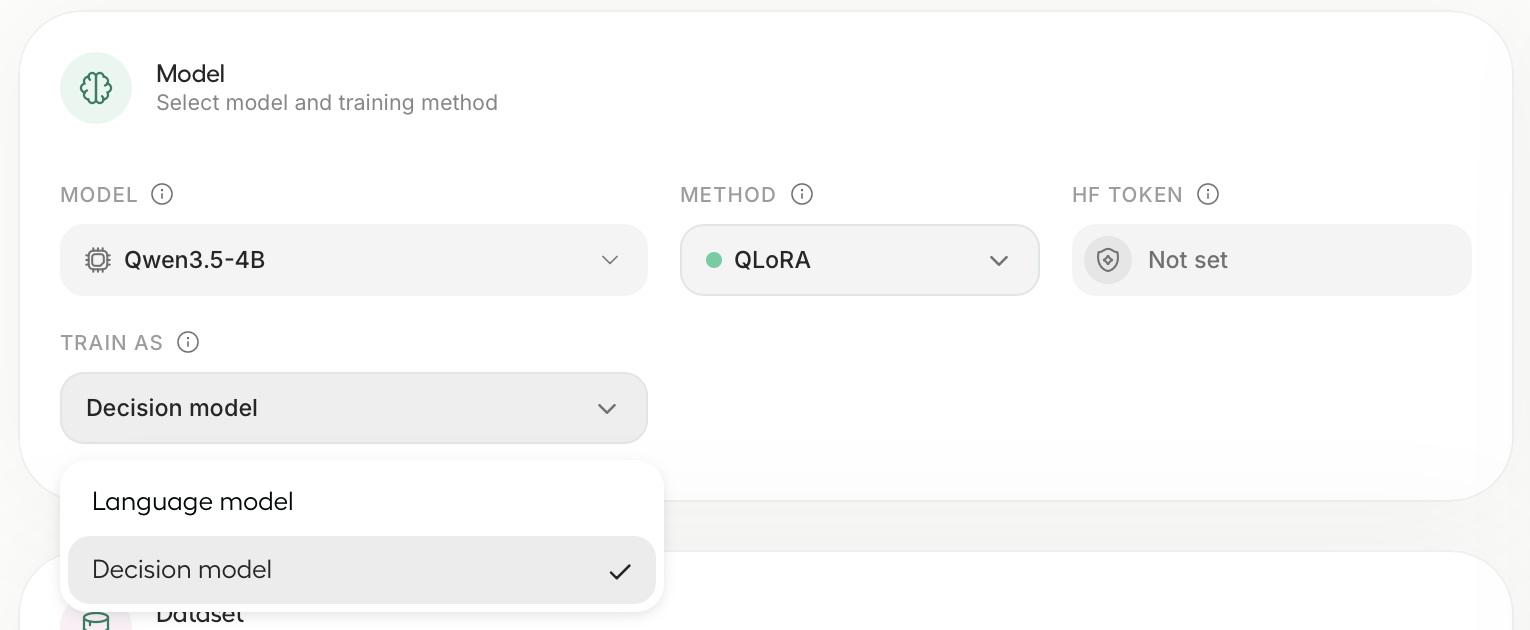
Screenshot: Unsloth's decision-model training guide. Shown here to illustrate the Studio controls.
Studio handles evaluation and calibration as part of this workflow. See Unsloth's UI walkthrough for the controls. Run either the Studio job or the notebook job at a time so they don't compete for GPU memory.
The rest of this post uses the notebook, so you can see each step in code.
Load Qwen3.5-4B as a decision model
from datasets import load_dataset
from transformers import TrainingArguments

model, tokenizer = FastDecisionModel.from_pretrained(
    model_name="unsloth/Qwen3.5-4B",
    max_seq_length=2048,
    load_in_4bit=True,
)

model = FastDecisionModel.get_peft_model(
    model,
    r=16,
    lora_alpha=16,
    lora_dropout=0,
    use_gradient_checkpointing="unsloth",
    random_state=3407,
)
The base model loads in 4-bit, and Unsloth attaches a decision head. Training updates that head and the LoRA adapters while keeping the base weights frozen. Keep this model for your first run so you can check the whole workflow before changing it.
Build the dataset
typed-decisions contains synthetic cases covering customer service, invoice processing, security incidents, and agent traces. The all subset combines all four workflows. Its labels come from a teacher model, so benchmark accuracy measures agreement with those labels, not independently verified business outcomes.
dataset = load_dataset("LocalLLaMA/typed-decisions", "all", split="train")
items, report = FastDecisionModel.build_dataset(dataset, tokenizer, model)
print(report)

train_items, eval_items = FastDecisionModel.split_holdout(items, seed=3407)
assert train_items and eval_items, "Need nonempty training and holdout sets."
print(f"Training items: {len(train_items)}; holdout items: {len(eval_items)}")
Inspect the report for skipped decisions and truncated inputs. At max_seq_length=2048, long inputs can lose context; increase the limit if that context matters and your GPU has enough memory. split_holdout keeps whole source rows together, reserving some for evaluation and calibration.
With the dataset and seed used in this walkthrough, our validation run used these splits:
| Split | Source rows | Decisions | Purpose |
|---|---|---|---|
| Training | 1,120 | 5,600 | Update the adapters and decision head |
| Holdout | 80 | 400 | Evaluate during training and fit calibration |
| Test | 400 | 2,000 | Measure the finished model on separate examples |
Each source row contains five decisions. The holdout is taken from the dataset's 1,200-row training split; the test split remains separate.
Train
trainer = DecisionTrainer(
    model=model,
    processing_class=tokenizer,
    train_dataset=train_items,
    eval_dataset=eval_items,
    args=TrainingArguments(
        per_device_train_batch_size=8,
        gradient_accumulation_steps=4,
        num_train_epochs=2,
        learning_rate=2e-4,
        lr_scheduler_type="cosine",
        warmup_steps=10,
        weight_decay=0.01,
        bf16=is_bfloat16_supported(),
        fp16=not is_bfloat16_supported(),
        eval_strategy="epoch",
        logging_steps=10,
        output_dir="/workspace/decision-training",
        report_to="none",
        seed=3407,
    ),
)
trainer.train()
This follows Unsloth's starting recipe: rank-16 LoRA, a learning rate of 2e-4, and two epochs. The decision head has a separate default learning rate of 1e-4.
For a shorter trial, add max_steps=60 to TrainingArguments. That overrides the epoch count. To run the full two epochs afterward, start again with a fresh base model and remove max_steps. If you run out of memory, halve per_device_train_batch_size and double gradient_accumulation_steps to preserve the effective batch size.
Unsloth reports 76% accuracy for a 60-step Qwen3.5-4B run in about 10 minutes on an L4. That is an upstream result, not a measured weightroom runtime or a target your dataset is guaranteed to reach.
Calibrate, then triage a ticket
Calibration adjusts the model's confidence using held-out examples. It aims to make probabilities more useful as estimates of correctness; check that on a separate test set before trusting a threshold.
before_calibration = FastDecisionModel.evaluate(model, tokenizer, eval_items)
calibration_metrics = FastDecisionModel.calibrate(model, tokenizer, eval_items)
print("Before calibration:", before_calibration)
print("Calibration:", calibration_metrics)
Then define a ticket and the questions you want answered:
ticket = "Hi, I was charged twice for invoice #4411. Please refund the duplicate today."
questions = {
    "team": {
        "type": "choice",
        "instructions": "Which team should handle this?",
        "criteria": {
            "billing": "invoices, payments, refunds",
            "technical": "bugs, outages, errors",
            "sales": "pricing, new plans",
        },
    },
    "refund": {
        "type": "noul",
        "instructions": "Does the customer ask for a refund?",
    },
    "urgency": {
        "type": "score",
        "instructions": "How urgent is this?",
        "criteria": ["not urgent", "soon", "today"],
    },
}

FastDecisionModel.for_inference(model)
answers = FastDecisionModel.predict(model, tokenizer, ticket, questions)

for name, result in answers.items():
    print(name, result["answer"], result["probabilities"])
team returns one of your three keys, refund returns a boolean, and urgency returns 0, 1, or 2. Inspect the probabilities as well as the selected answers.
Our completed run returned these answers for the ticket above, after calibration:
| Decision | Selected answer | Probability of that answer |
|---|---|---|
| Team | billing | 99.99% |
| Refund requested | yes | 99.34% |
| Urgency | 2 (today) | 98.83% |
These are observed outputs for one example. A confident prediction can still be wrong, and these probabilities need validation on your own tickets.
For example, this routing rule requires the model to choose billing with a probability of at least 0.8:
billing = answers["team"]
route = (
    "billing"
    if billing["answer"] == "billing" and billing["probabilities"]["billing"] >= 0.8
    else "human_review"
)
print("Route:", route)
The threshold is illustrative. Choose it using labeled tickets from your own workflow and the cost of a wrong route. Detecting a refund request does not establish that a refund should be approved.
Banana or not banana
Questions are supplied with each request. You can try a new question without changing the output layer, although accuracy on that question still needs testing:
banana_answers = FastDecisionModel.predict(
    model,
    tokenizer,
    "Long, yellow, curved, and slightly brown at the tips.",
    {"banana": {"type": "noul", "instructions": "Is this describing a banana?"}},
)
print(banana_answers["banana"]["answer"])
print(banana_answers["banana"]["probabilities"]["true"])
This toy example uses a text description. A confident answer to it says little about performance on customer tickets; evaluate each intended use separately.
Measure accuracy on the test split
test = load_dataset("LocalLLaMA/typed-decisions", "all", split="test")
test_items, test_report = FastDecisionModel.build_dataset(test, tokenizer, model)
assert test_items, "No usable test items."
print("Test data:", test_report)
test_metrics = FastDecisionModel.evaluate(model, tokenizer, test_items)
print("Test metrics:", test_metrics)
Keep this split out of both training and calibration. Read accuracy alongside calibration error (ECE) and loss, and record how many decisions were skipped. A low calibration error alone does not establish that the model is useful. For production work, also evaluate on representative examples reviewed by people who understand the task.
Results from our weightroom run
We ran the complete two-epoch notebook on one NVIDIA RTX A6000 on October 9, 2026, using the code above. These are measurements from that run, not performance guarantees.
| Measurement | Result |
|---|---|
| Optimizer steps | 70 |
| Test decision accuracy | 78.15% |
| Test rows with every decision correct | 33.25% |
| Test calibration error (ECE) | 0.0381 |
| Trainer time, including epoch evaluations | 20 min 03 sec |
| Loading, training, evaluation, and export | 24 min 26 sec |
| Peak PyTorch allocated GPU memory | 8.11 GiB |
Decision accuracy scores individual answers. Row accuracy requires all five answers in a source row to be correct. Both measure agreement with the dataset's synthetic teacher labels. ECE measures the gap between confidence and observed accuracy; lower is better. The memory figure excludes CUDA context and other processes, and the timings exclude workspace startup and the later reload checks.
Tested environment and image
The notebook used Unsloth 2026.10.3, Unsloth Zoo 2026.10.3, Transformers 5.17.0, PyTorch 2.11.0+cu128, and CUDA 12.8. The image disables automatic compilation and package updates as described above.
ghcr.io/benpoliquin/templates/unsloth@sha256:90c9c8c11da704f7cc33decde3bec78697b56579fa9c9f37003d2038282214c8
Save to your workspace
model.save_pretrained("/workspace/qwen-decisions")
model.save_pretrained_merged("/workspace/qwen-decisions-merged")
The first directory holds the LoRA adapters, decision head, and associated configuration. The second holds a merged 16-bit model and requires more disk space. Preserve the whole directory, including the head and calibration files.
Restart the notebook kernel to release the training model and optimizer from GPU memory, then load the adapter version:
from unsloth import FastDecisionModel

model, tokenizer = FastDecisionModel.from_pretrained(
    "/workspace/qwen-decisions",
    load_in_4bit=True,
)
FastDecisionModel.for_inference(model)
Rerun the ticket cell to check inference from the saved model. You can test the merged export in another fresh kernel by replacing the path with /workspace/qwen-decisions-merged.
In our fresh-process checks, both exports returned the same three ticket answers as the training process. The largest probability changes were 0.0013 for the adapter and 0.0052 for the merged export. Reloading in 4-bit can shift probabilities; check your routing threshold on the artifact you will actually use.
We also stopped and resumed the workspace, verified that the saved model files were unchanged, and reran both reload checks successfully.
Stop the workspace when you're finished using the GPU. Keep the saved files on its volume for your next session and retain a separate copy of artifacts you need to keep.
Train on your own decisions
Every training row has three fields. state is the input, as text or JSON. questions holds the questions to decide, in the same format as predict. gold holds the correct answer to each question:
{
  "state": "Hi, I was charged twice for invoice #4411. Please refund the duplicate today.",
  "questions": {
    "team": {
      "type": "choice",
      "instructions": "Which team should handle this?",
      "criteria": {
        "billing": "invoices, payments, refunds",
        "technical": "bugs, outages, errors",
        "sales": "pricing, new plans"
      }
    },
    "refund": {
      "type": "noul",
      "instructions": "Does the customer ask for a refund?"
    }
  },
  "gold": {
    "team": "billing",
    "refund": true
  }
}
Give a choice question the option key as its gold answer, a noul question true or false, and a score question the level number. To supply a distribution, put it inside that question's gold object, for example "refund": {"probabilities": {"false": 0.1, "true": 0.9}}.
The example is expanded for readability. In a JSONL file, put each complete row on one line. Upload your file to /workspace, then use this cell in place of the sample-dataset cell in a fresh training run:
import json

with open("/workspace/my-decisions.jsonl", encoding="utf-8") as f:
    rows = [json.loads(line) for line in f if line.strip()]

items, report = FastDecisionModel.build_dataset(rows, tokenizer, model)
train_items, eval_items = FastDecisionModel.split_holdout(items, seed=3407)
print(report)
assert train_items and eval_items, "Add more labeled examples before training."
Replace the test dataset too: a model trained on your ticket schema should be evaluated on tickets with that same schema. Include ambiguous requests, missing context, and examples that should go to a person. Keep related tickets from the same customer or incident in the same split to avoid leaking context across training and evaluation.
Start with one useful decision, measure its errors, and choose a confidence threshold that earns its place in your workflow.
Launch an Unsloth workspace on weightroom to run the notebook and train your own decision model.
Explore GPU Workspaces.
Choose a pre-configured environment for development, training, or inference.